
Book a Demo
See what your location could tell you
Our team walks you through the dashboard and reports from a location like yours, then shows you how we would count yours.
- Phone
- 0116 326 5389
- Watch first
- View It in Action, the walkthrough on this site
Pick a time
Open in a new tabBookings are handled by Calendly. How we use your details
What a demo covers
One call with the team that would run your counting. You come away knowing what the data would show for your location and how we would collect it.
- 01
You tell us about the location
Where it is, how people arrive and move through it, and the decision you need the numbers for.
- 02
We show you the dashboard and reports
Counts by day and hour from a location like yours, so you can see the kind of answers you would get before you commit.
- 03
We say how we would count yours
Where the counting points would go and what each one would measure. If you want to go ahead, a site survey comes next.
What you'll see in the demo
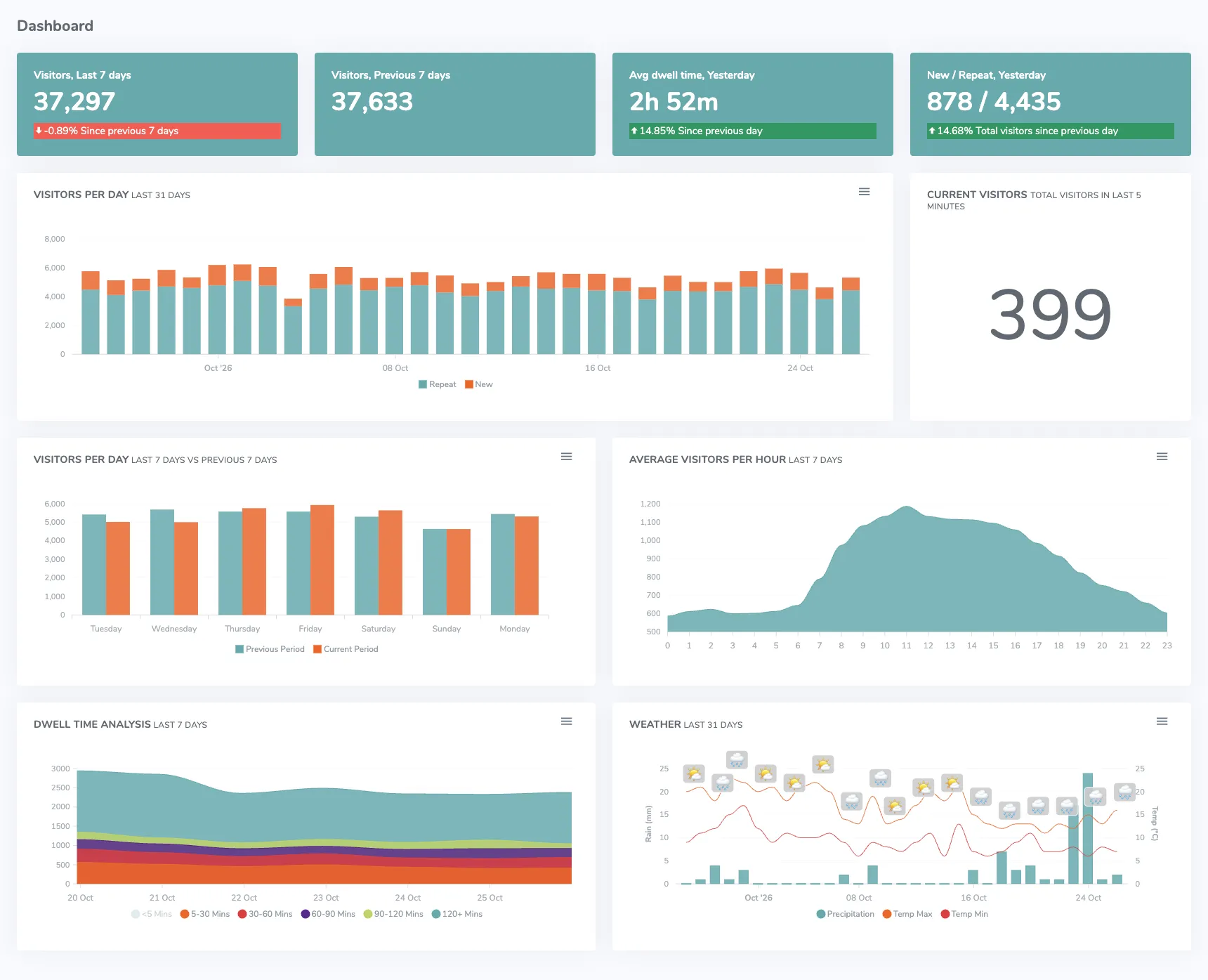
The dashboard you would log in to: visitors over the last week and month, new and repeat visitors, dwell time, the busiest hours and the weather each day. It is one of dozens of reports in the portal, and on the call we take you through the ones that matter for your location. More on Footfall Analytics
Before the call, see it for your industry
Each industry page shows where the sensors go and what the reports measure for that kind of location. Each solution page explains what we count.
Not ready for a call yet?
Watch the walkthrough on this site, or send us a question. You can also call us on 0116 326 5389.